
A few days ago, I released on GitHub a plugin called Uptime Kuma Connector for Cheshire Cat AI aka Stregatto aka the big cat that, once installed, can answer questions like:
- Is the XYZ service active?
- Why can’t I connect to the XYZ (site)?
- Is the XYZ site available?
- Is it my problem or the service’s?
To perform these checks, the plugin connects to an Uptime Kuma installation and queries it, verifying whether the requested service or site is working or not.
How does the plugin work?
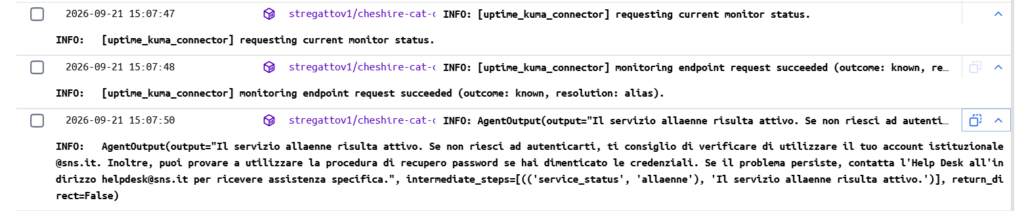
The plugin exposes to Stregatto a single tool, service_status(). When the user writes “I can’t access Esse3“, the model retrieves the tool, deduces the service name from the request, and invokes the tool passing the service name as a parameter.
At that point, the plugin:
- reads the
/metricsendpoint of the Uptime Kuma instance, authenticating with the API key; - resolves the name requested by the user into one or more monitors: first with the configured aliases, then by exact name, and finally by containment (with a minimum of 3 characters on each side);
- returns to the model a phrase like: “the system is available” (not a JSON to interpret).
I used /metrics instead of the APIs because Uptime Kuma does not have a general REST API, and status pages require publishing the data. /metrics, however, is protected by a key and already contains everything needed.
The status of a service is never “made up”; at most, it admits being unable to retrieve it. The possible outcomes are four:
- known: the service was recognized and the status is known (up, down, pending, maintenance);
- not_monitored: no monitor matches and the plugin explicitly tells the model not to infer that the service is working;
- ambiguous: too many monitors match, better ask the user which one they mean;
- unknown: missing configuration, unreachable instance, unreadable response.
The plugin is read-only, meaning it does not make changes to Uptime Kuma or the defined monitors.
Installation and configuration
On Uptime Kuma: go to Settings > API Keys > Add API Key and create a read-only key. Copy it immediately, as Kuma does not show it a second time.
On Cheshire Cat AI: go to plugins, search for Uptime Kuma Connector, then click first on Install and then on Configure, finally set the configuration parameters.
All plugin settings are in the admin panel:
- Instance URL: only the base URL, like
https://kuma.example.org. If empty, the connector is disabled; - API key: the one created above;
- Alias map (optional): one entry per line, in the form
U-GOV, UGOV: 12, where on the left are the names users use and on the right the monitor IDs. This is useful when the “human” service name does not resemble the monitor name — which is practically always the case; - Maximum response (KiB) and timeout (seconds): safety limits, default 1024 KiB and 2 seconds.
A small warning: in the big cat settings, procedural_memory_k must be at least 1, otherwise the tool is never retrieved and it seems the plugin does not work.
Usage examples
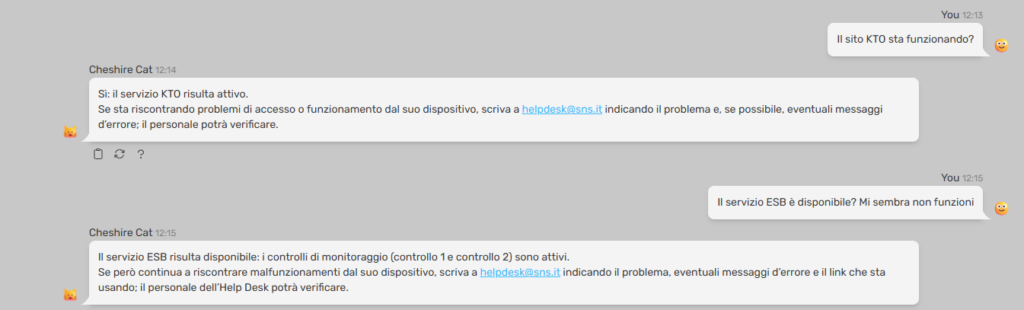
From the Stregatto query interface:

An example of logs produced by these queries:
Conclusions
This is a product that can be reused in various contexts; we used it for a help desk chatbot based on a RAG system, where the question “is the service down?” comes up several times a day and the correct answer is not found in any indexed document.
The license is GPL-3.0, so anyone can download, install, and modify it. The only dependency is httpx, which is already present in the core of Cheshire Cat AI: basically, nothing new needs to be installed.
If you need further clarifications or have modification proposals, feel free to contact me, or better yet, open an issue directly on GitHub.
Sources and references
- Cheshire Cat AI, official website.
- Cheshire Cat AI repository for version 1.9.2 (the version for which this plugin was developed).
- Uptime Kuma Connector, repository on GitHub.
*** Note: This article was automatically translated using a workflow created with n8n and OpenAI. The original version of the post is the Italian one.