
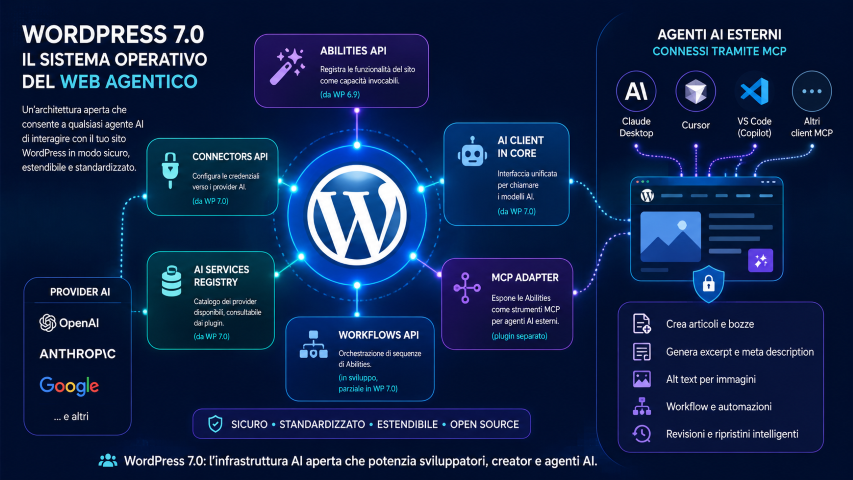
With the release of version 7 of WordPress, I started exploring some of the most interesting new features introduced by the platform, especially those related to the use of Artificial Intelligence, agents and LLMs.
I would like to list them in this post and describe them in an orderly and simple way, so I can gradually deepen my understanding and clarify my ideas.
Below I list the main new features and some official plugins that leverage them:
Abilities API
They were already introduced in WordPress 6.9, but in this version they are enhanced and find immediate application.
Basically, it is a way within the core, plugins, or themes to register “abilities” or rather very specific operations, with defined input and output parameters and permissions.
These abilities, as we will see, can be used by an MCP server so that a connected agent (MCP client) can request the website to execute these operations.
This is the syntax to define an ability:
add_action( 'wp_abilities_api_init', function() {
	wp_register_ability( 'mioplugin/genera-excerpt', [
		'label'               => 'Generate excerpt with AI',
		'description'         => 'Automatically generates the excerpt of a post using the configured AI model.',
		'category'            => 'mioplugin',
		'input_schema'        => [
			'type'       => 'object',
			'properties' => [
				'post_id' => [ 'type' => 'integer' ],
			],
			'required'   => [ 'post_id' ],
		],
		'permission_callback' => fn( $args ) => current_user_can( 'edit_post', $args['post_id'] ),
		'meta'                => [ 'mcp' => [ 'public' => true ] ],
		'execute_callback'    => function( $args ) {
			$post    = get_post( $args['post_id'] );
			$excerpt = wp_ai_client_prompt( 'Write an 80-word excerpt: ' . $post->post_content )
				->generate_text();

			wp_update_post( [ 'ID' => $post->ID, 'post_excerpt' => $excerpt ] );

			return [ 'success' => true, 'excerpt' => $excerpt ];
		},
	] );
} );
An ability defined like this can be invoked by an agent like Claude Desktop with a request such as: “Generate the excerpt for post 42“.
AI Client
It is a core library that allows standard calls to language models.
In practice, a plugin or theme using the AI Client does not have to manage authentication, rate limiting, or request formatting: it passes its request to the client, which routes it to the configured provider via Connectors. This way, regardless of the provider used (OpenAI, Anthropic, or others), the call always maintains the same form. For example:
$client = wp_ai_client();
$response = $client->complete([
    'prompt' => 'Generate a summary: ' . $content,
    'max_tokens' => 200,
]);
update_post_meta( $post_id, '_excerpt_ai', $response->text );
Connectors API and AI Service Registry
Connectors are objects that manage the credentials of your accounts.
They are managed from the WordPress back office: WP->Settings->Connectors; there are already three default connectors that can be configured: OpenAI, Anthropic, and Google, and others can be added using plugins.
Once a connector is configured with its own API key, all plugins use it transparently through the AI Client.
Alongside Connectors, there is a system for registering providers and AI services available on the site, allowing plugins to identify the abilities offered by different models: text generation, image generation, embedding, etc.
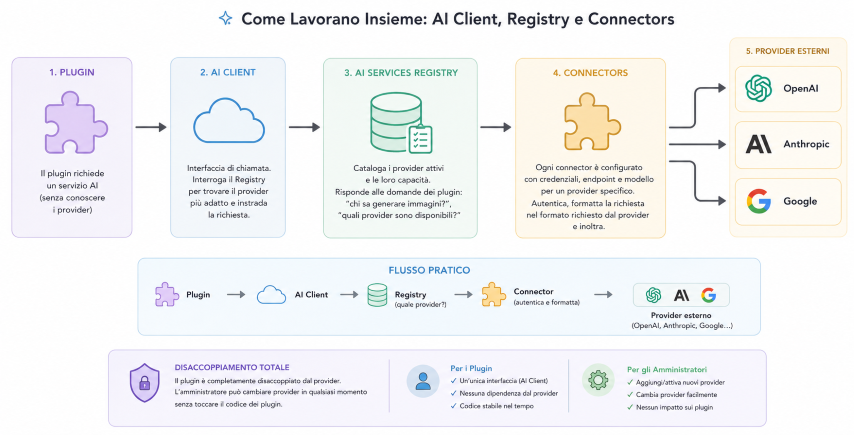
The three components seen so far form a pipeline with distinct roles:
- Connectors: configure providers (credentials, endpoint, model). They register with the Registry upon activation.
- AI Service Registry: catalogs active providers and their abilities. Allows plugins to identify which services are available and which operations they support.
- AI Client: is the calling interface. It queries the Registry to find the suitable provider, then routes the request to the correct Connector, which translates it into the specific format of the external provider.
The practical flow is:
Plugin → AI Client → AI Service Registry (which provider?) → Connector (authenticates and formats) → External Provider (OpenAI, Anthropic, etc.)
MCP Adapter
The Model Context Protocol (MCP) is an open standard created by Anthropic to connect AI agents to external tools and data.
The WordPress MCP Adapter is a plugin that implements this protocol and translates registered Abilities into MCP “tools” that any compatible client (Claude Desktop, Cursor, VS Code) can discover and execute in natural language.
Examples of prompts with connected Claude Desktop:
- “Create a draft article, Tech category, with a 150-word introduction on artificial intelligence.”
- “Find all posts without excerpts, generate an 80-word summary for each, and save it.”
The MCP Adapter is not included in the WP 7.0 core: it must be installed as a separate plugin from github.com/WordPress/mcp-adapter.
AI Features in the Editor
It would seem obvious to immediately apply all these features to the WordPress back office to have buttons that allow an operator to translate or correct text, generate an excerpt, create images and illustrations, or classify posts by categories and tags. I must admit this was one of the first things I thought about and would be very convenient.
In reality, none of this exists yet.
However, there are plugins that add these features: AI Engine, ClassifAI, AI (official but experimental WordPress team plugin), and AI Block Editor.
Agent Skills
The skills are packages of instructions, checklists, and scripts designed for AI coding agents (Claude Code, Cursor, VS Code Copilot, OpenAI Codex). The agent reads them before starting work on a project to follow current best practices and avoid outdated patterns, common security errors, and deprecated blocks/functions.
The official skills available for WordPress (agent-skills) teach AI agents how to develop correctly for WordPress: Gutenberg blocks, block themes, plugins, and the use of modern APIs, according to the platform’s latest standards.
They are installed at the system or project level by downloading and running an installation script, but we will cover this in detail in another post.
Workflows API
The Workflows API is probably the least mature area of the entire WordPress AI ecosystem.
The declared goal is to provide a system to chain Abilities into automatic sequences triggered by events; however, at the moment, there is no autonomous and mature API with its own functions (like wp_register_workflow), no complete operational documentation, and no visual interface in the core to create workflows without code.
“Workflows” today are built by chaining Abilities in PHP via WordPress hooks and the AI Client.
Nevertheless, the possibility of creating automated flows by chaining functions and leveraging AI capabilities is extremely interesting and represents one of the most promising directions for the platform’s evolution.
Currently, third-party plugins exist (WP Webhooks, Uncanny Automator) for visual no-code workflows.
Visual Revisions
Not closely related to AI, but still a very convenient feature: it introduces a more visual mode to compare revisions and changes compared to the traditional textual comparison.
Instead of reading raw diffs of code, you can scroll through versions like flipping through a presentation, immediately see what changed in blocks and layout, and restore a version with one click.
Conclusions
There are many important new features; so far, I have only had the chance to try a few things rather quickly, but in the coming days, I want to explore these topics more deeply, especially the support for MCP.
In particular, I would like to add an MCP server to the Asset Lending Manager plugin, which I maintain.
Sources and References
- WordPress 7.0 Armstrong: official release.
- WordPress 7.0 Field Guide (Make WordPress Core).
- What’s New for Developers — May 2026.
- How WordPress 7.0 Is Building the Foundation for AI-Powered Sites.
- From Abilities to AI Agents: Introducing the WordPress MCP Adapter.
- WordPress/mcp-adapter: official GitHub repository.
- WordPress: The Operating System of the Agentic Web (Automattic).
- ClassifAI: open, enterprise-ready AI features for WordPress.
- AI Engine: The AI Plugin for WordPress (Meow Apps).
- AI Plugin: official WordPress plugin.
- WordPress/agent-skills: official GitHub repository.
- The plugin WP WebHooks.
- The plugin Uncanny Automator.
*** Note: This article was automatically translated using a workflow created with n8n and OpenAI. The original version of the post is the Italian one.