
SPID (Public Digital Identity System) is an authentication system that allows access to online services of the Public Administration.
What is it and what is it for?
SPID is a digital identity with which every citizen can be recognized by the online systems of a Public Administration and use the services it offers. The great thing is that not only does SPID really work, but it is also easy to obtain and easy to use. Moreover, more and more Public Administrations are replacing old authentication systems with SPID to allow access to the services offered and reserved areas of their websites.
To authenticate via SPID, you basically need to remember: a username, a password, and a PIN for the app of your Identity Provider (the next paragraph explains what an Identity Provider is). Obviously, you must have your smartphone with the app installed.
Essentially, with the same credentials, you can access services such as:
- The INPS website.
- The Revenue Agency website (which also offers the pre-filled tax return).
- The Electronic Health Record of the Tuscany Region (although currently it does not work).
- Registration for public competitions on the RIPAM website.
- Access to services and payment of local taxes in many municipalities.
- The INAIL website.
Soon, there will be no need to have a different account for each site, as you will be able to access all with SPID. For this reason, it is advisable to get SPID as soon as possible and learn how to use it. Moreover, “SPID is free and will always be free“, as stated on the official website:

You can use SPID on all sites where this button is present:

SPID provides three levels of authentication depending on the information provided to the site you are authenticating with: the first requires only username and password, the second requires an additional code (PIN) on an app on your smartphone, and the third uses a Smart Card or other equivalent devices.
My experience is that most services are accessible using the second level of authentication (INPS, Revenue Agency, and Electronic Health Record).
How to obtain it and how much does it cost?
Getting SPID is very simple; you need to contact one of the accredited providers (Identity Providers) and then:
- Fill out an online form on the Identity Provider’s website to request it,
- Choose your SPID credentials,
- Proceed with the initial identification,
- Install an app on your phone to receive the code for second-level authentication (For example, for Poste Italiane, the app is called PosteID).
The method for step 3 depends on the provider and whether you are already their customer or not.
For example, if you choose Poste Italiane’s SPID and you are not a Poste customer, you just need to go to any post office for identification; if you are a customer, you can use the Poste app or one of the Poste ATMs.
To request SPID, you must be of legal age and have the following documents ready:
- Identity card.
- Health card.
- Your mobile phone number.
- Your email address.
SPID is free, but some Identity Providers offer additional paid services. I obtained mine from Poste without paying anything.
How to use it?
Access to all Public Administration sites via SPID happens the same way, namely:
- Clicking the Login with SPID button.
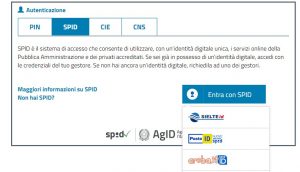
- Selecting your Identity Provider:
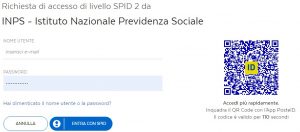
- Entering your username and password (or scanning the proposed QR Code):
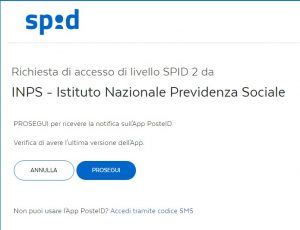
- Clicking Continue to receive the notification on the Identity Provider app:
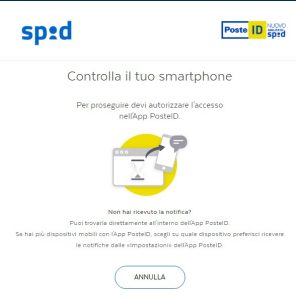
- At this point, on your smartphone, a notification appears; clicking it opens your Identity Provider’s app, which asks you to enter the PIN associated with SPID:
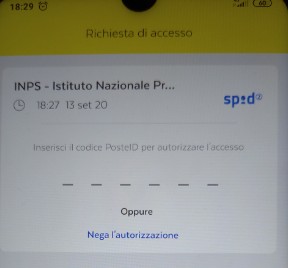

- Clicking Consent to proceed with data transfer:
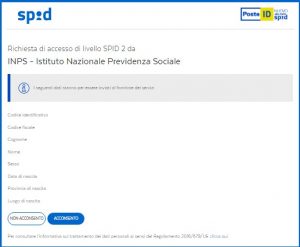
At this point, you are authenticated on the Public Administration site and can use the services offered.
Is it possible to integrate it on your own site?
The number of Public Administrations using SPID for citizen authentication grows daily, but SPID can also be used to authenticate users on private sites. I have not explored this topic in depth; on the developers.italia.it forum (the site for software developers for Public Administrations), there are various discussions on the subject. It seems there is a basic KIT for implementing the integration and that specific KITs for major platforms (including Ionic) are still under development. Perhaps if I do some tests, I could write a post with the results of the experiment. I also have not understood if the service is paid for private sites.
Considerations
Digital identity is essential to create an integrated system that allows citizens to access online services offered by Public Administrations. In my opinion, SPID is well designed and, above all, works well. It is very convenient and easy to use. The hope is that all national administrations adapt their sites to this standard, as well as provinces, regions, and municipalities.
That said, digital identity is only the first step towards the digitalization of the Public Administration because once authenticated, the citizen must be able to access services, and the difficult part is precisely putting these services online. Some progress is being made in this direction; the pre-filled tax return provided by the Revenue Agency is a positive example of an integrated, usable, reliable, and effective service that meets citizens’ needs.
But there is still a long way to go. I think about how much could be done in the fields of Healthcare, Education, job searching, and handling bureaucratic procedures for small and medium enterprises.
Sources and references:
- The official SPID website.
- Request SPID.
- List of services accessible with SPID.
*** Note: This article was automatically translated through a workflow created with n8n and OpenAI. The original version of the post is the Italian one.