
Some time ago in a post [6] I talked about the tests done to query ChatGPT [3] using a library provided by OpenAI. Meanwhile, Google has also introduced a similar solution called Bard [2] which is based on the PaLM language model developed by Google itself. In this case too, it is possible to use a library to make queries using Python code.
Clarifications on names and acronyms
First of all, it is necessary to clarify the meaning of some terms and acronyms:
- LLM (Large Language Model): a type of artificial intelligence model designed to understand and generate text coherently and contextually appropriately, used in natural language processing applications where it is necessary to interpret textual input and respond with textual and conversational output.
- PaLM 2 (Pathways Language Model): a family of large language models (LLM) developed by Google, equivalent to OpenAI’s GPT-3.5 or GPT-4.
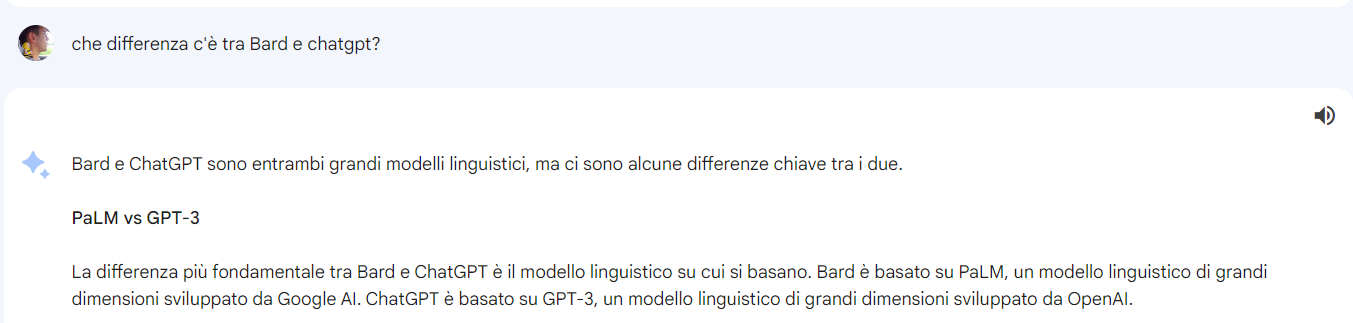
- Bard: a chatbot that uses PaLM to perform its tasks and answer users’ questions through a web interface.
- ChatGPT: a chatbot that uses GPT to perform its tasks and answer users’ questions through a web interface.
- OpenAI: the company that developed the ChatGPT chatbot and the GPT-* language models.
- Google: the company that developed the Bard chatbot and the PaLM * language models.
So PaLM and GPT are two different implementations of LLMs used respectively by Bard (Google) and ChatGPT (OpenAI).
How AI and LLMs can help programmers
For this post, I took as a reference the usual mini-course offered by DeepLearning.ai and taught by Andrew Ng and Laurence Moroney. The course is called “Pair Programming with a Large Language Model” and focuses on how AI can assist developers in their daily work.
An LLM can be used for the following purposes:
- Improving existing code: You can provide a function and ask if there is an alternative or better way to write something equivalent. Example prompt: “Is there a better way to write this function in Python? <function>“.
- Simplifying code: You can ask for a kind of code review and simplification of given code. Example prompt: “Is it possible to simplify this Python code to create a list of objects? <example_code>“.
- Writing tests: You can ask to create unit tests for classes and functions. Example prompt: “Can you create unit tests for this Python code? <example_code>“.
- Making code more efficient: You can ask to review the code to identify and eliminate unnecessary, unoptimized, and inefficient parts. Example prompt: “Can you make this Python code more efficient? <example_code>“.
- Finding errors: In case of code producing errors or crashes, you can ask for help to find the bug. Example prompt: “Can you help me debug this code? <example_code>“.
- Explaining and commenting code: Often, when working on code written a long time ago or by others, it can be helpful to get assistance interpreting it. Example prompt: “Can you explain line by line what this code does? <example_code>“.
- Writing technical documentation: A tedious task is writing technical documentation; here too, you can ask for help with a specific prompt. Example prompt: “Can you write technical documentation for this Python code? <example_code>“.
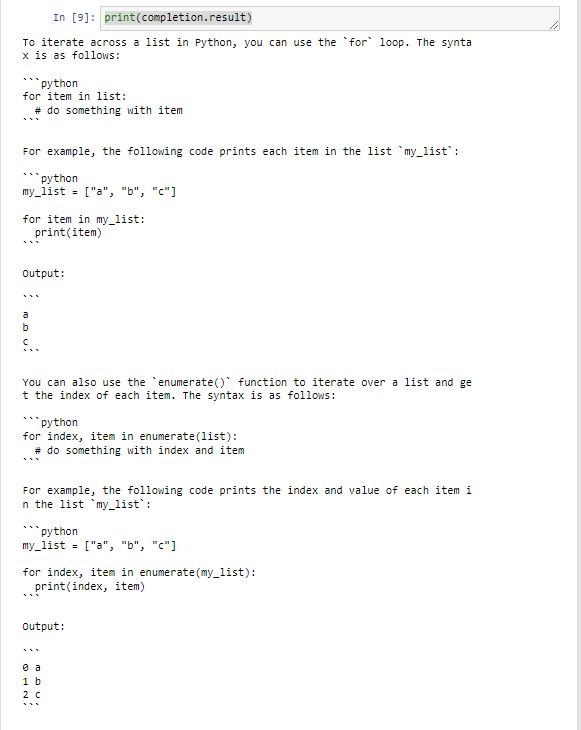
- Requesting implementation of an algorithm: You can also ask to create an algorithm that performs a specific task. Example prompt: “Write code to iterate over a list in Python and print all its elements“.
These are just some of the ways you can query PaLM during programming activities. Obviously, all the most popular programming languages are supported, not just Python.
Example of using the library
Below is an example taken from the course [1], this time I did not create a repository for custom examples:
#Step 1: Install the library.
# pip install -q google.generativeai

#Step 2: Get the right model.
from utils import get_api_key
import os
import google.generativeai as palm
from google.api_core import client_options as client_options_lib

#Step 3: Configure the library and set the personal key.
palm.configure(
    api_key=get_api_key(),
    transport="rest",
    client_options=client_options_lib.ClientOptions(
        api_endpoint=os.getenv("GOOGLE_API_BASE"),
    )
)
#Step 5: choose the right model.
models = [m for m in palm.list_models()
    if 'generateText'
    in m.supported_generation_methods]
model_bison = models[0]

#Step 6: Define a wrapper to retry if a call fails.
from google.api_core import retry
@retry.Retry()
def generate_text(prompt, model=model_bison, temperature=0.0):
    return palm.generate_text(prompt=prompt, model=model, temperature=temperature)

#Step 7: Define the prompt.
prompt = "Show me how to iterate across a list in Python."

#Step 8: Generate the response and print it.
completion = generate_text(prompt)
print(completion.result)
The result will be:
Steps to follow to use the library
Using PaLM is not free. The steps to register and run the code from the previous paragraph locally are as follows:
- Register on Google Cloud [4]
- Add your credit card as a payment method.
- Create a project.
- Enable the library for this project: Generative Language API.
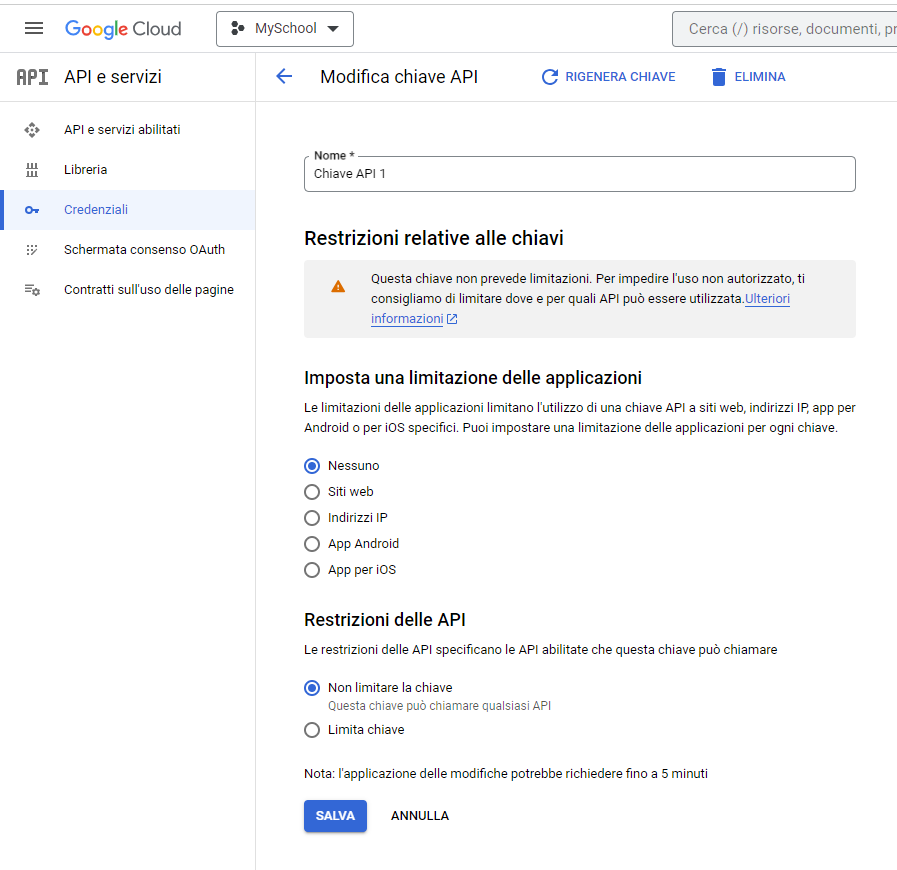
- Create an API Key.

- Set the generated key in the environment variable: GOOGLE_API_BASE.
- Run the code from the previous paragraph.
Warning: As always, protect the generated key as much as possible to prevent it from spreading and being used without authorization. Optionally, activate alerts and spending thresholds.
Considerations
Code developers have always sought tools that allow them to be more productive and write better, more performant, bug-free, and readable code.
The rise of artificial intelligence technologies and LLM models has not been seen as a threat but as an opportunity to speed up and simplify their work. Some tedious tasks can be simplified by these tools. I think of bug detection, code understanding, and unit test development.
However, it is not advisable to copy and paste code provided by AI without testing and verifying it because it is not free from errors, hallucinations, and hidden pitfalls. This means AI can be used in your work, but it must be done with judgment and care.
The output provided by AI depends greatly on the quality of the input prompt, and the quality of the input prompt depends heavily on the programmer’s skill. The law “garbage in, garbage out” always applies.
Finally, due to how AI is programmed and trained, the results produced are always “average solutions,” i.e., reworkings of things someone else has already done and found in some document or tutorial. For original and creative solutions, one will still need brilliant and creative human programmers.
Sources and references
- [1] Course “Pair Programming with a Large Language Model” by Andrew Ng and Laurence Moroney.
- [2] Bard, the Google chatbot.
- [3] ChatGPT, the OpenAI chatbot.
- [4] Google Cloud Platform.
- [5] Introducing PaLM 2, Google’s next generation large language model by Google Research.
- [6] Querying ChatGPT with Python on claudiobattaglino.it.
*** Note: This article was translated using an automated workflow built with n8n and OpenAI.