
A few years ago, to implement authentication on some flows created with Mulesoft, I used the Spring Security module [5] with satisfactory results. Of course, I would have preferred if Mulesoft provided a proprietary component specifically for this functionality, but the existing one does not work with the software’s Community Edition, so I had to resort to an external module.
However, this component worked well until I needed to update the module from version 1.3.6 to a later version, such as 1.3.9. In that version, several things had changed, including the component definition format it was impossible to update the module without encountering an error, and I found no resolution to the problem in various forums where it was even advised not to update the component [6][7][8][9].
So, I postponed the update until transitioning to the new Runtime (Mule Server), when it became inevitable to address and resolve the issue.
Problem Description
The problem, in short, stemmed from the introduction of the ability to use multiple Security Providers within a Security Manager, and these two components, which were previously at the same level, are now nested within each other.
Before:
<spring:config name="Spring_Config" doc:name="Spring Config" doc:id="zzzzzz" files="beans.xml" /> <spring:security-manager doc:name="Spring Security manager" doc:id="xxxxxxxxx" > <spring:delegate-security-provider name="auth-manager" delegate-ref="authenticationManager" /> </spring:security-manager>
After:
<spring:config name="Spring_Config" doc:name="Spring Config" doc:id="zzzzzz" files="beans.xml" /> <spring:security-manager doc:name="Spring Security manager" doc:id="xxxxxxxxx"> <spring:delegate-security-providers> <spring:delegate-security-provider name="auth-manager" delegate-ref="authenticationManager" /> </spring:delegate-security-providers> </spring:security-manager>
At the same time, however, the Software Anypoint Studio, which is the IDE (based on Eclipse) used to design flows in the Mulesoft CE version, did not recognize the new syntax and returned errors when using the new format:
Element: delegate-security-provider is not allowed to be child of element Spring Security manager apiugovqueries.xml /apiugovqueries/src/main/mule Spring Security manager Message Flow Error
This error made it impossible to update the Spring Security module from version 1.3.6, the last working version, to any subsequent version.
Problem Resolution
When the need arose to also upgrade to a more recent version of Mulesoft’s Runtime (the so-called core), it seemed wise to attempt a comprehensive system update that included the latest versions of Java, Runtime, Anypoint Studio, Spring Security, and all other modules.
Based on the compatibility schema available on the official site [10], we decided to perform the following updates:
| Product | Old Version | New Version |
| Java SDK | 1.8 | 17 |
| AnyPoint Studio | 7.20 | 7.22 |
| Runtime Mule Server | 4.5 | 4.9 |
| Spring Security | 1.3.6 | 2.1.1 |
Additionally, since the system was running on a Docker container, it was necessary to update it as well, but this might be the subject of another post, especially since I was considering integrating the Docker-produced image into a Helm Chart (a tool for deploying on Kubernetes).
The steps followed were as follows, first of all, once it is necessary:
- Install Oracle Java SDK 17 [12] and consequently modify the system PATH and the JAVA_HOME environment variable.
- Update/Install Anypoint Studio to the latest version.
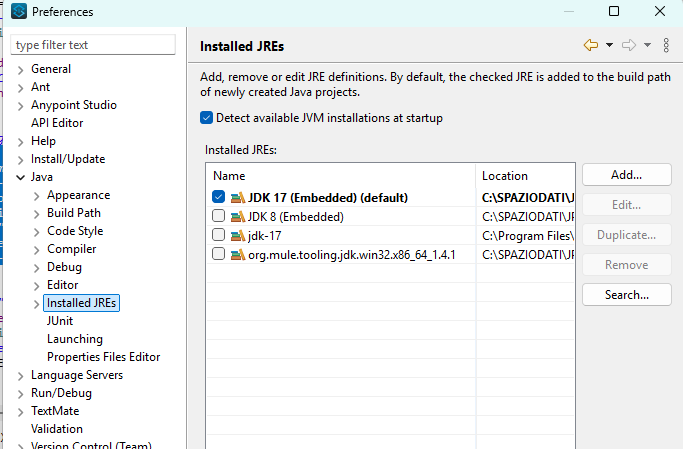
- In Anypoint Studio: Add jdk 17 in Window->Preferences->Java->Installed JREs.
Then, for each project:
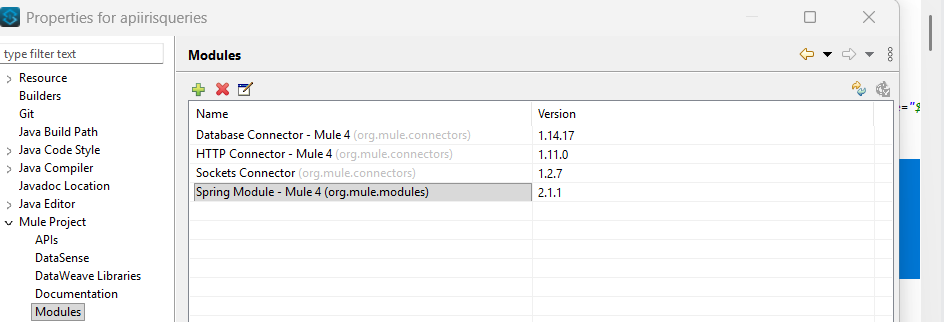
- Update all modules: right-click on the project name->Properties->Mule Project->Modules. All modules were updated to the latest version, particularly the Spring Module was updated to version 2.1.1.
- Still in the project properties: Properties->Java Compiler:
- Check “Enable project specific settings“.
- Set Compiler compliance level = 17.
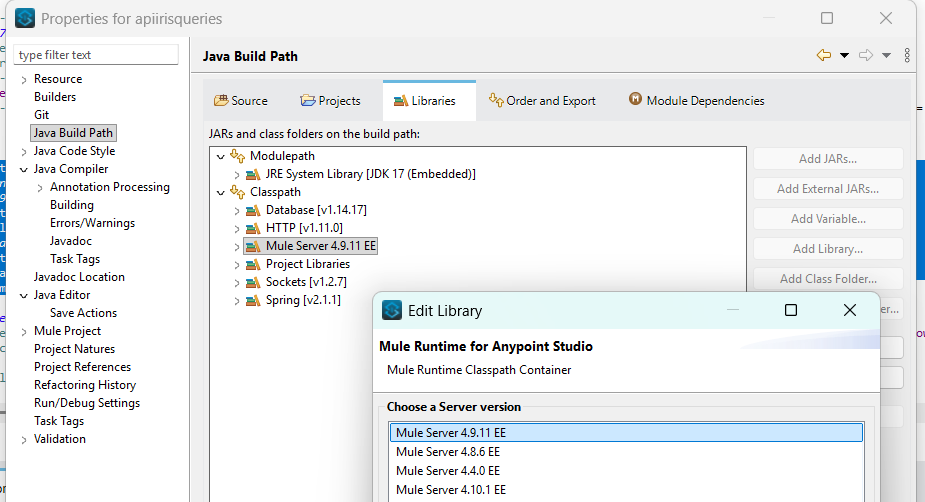
- Still in the project properties: Properties->Java Build Path->Libraries:
- Set the JRE System Library version to JDK 17.
- Set the Mule Runtime Server version to 4.9.1.
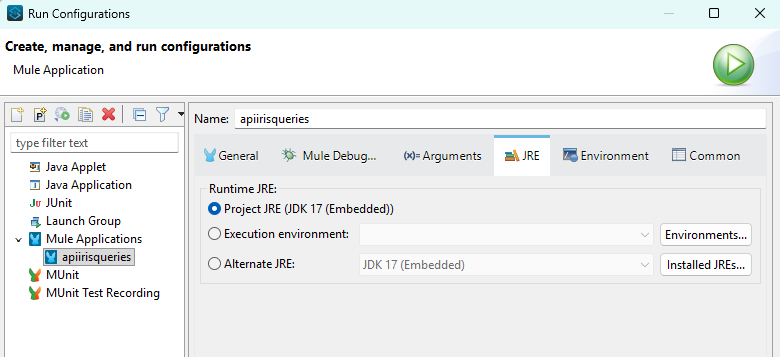
- Ensure that both the Run Configuration (Run->Run configuration..) and the Debug Configuration (Run->Debug Configuration…) use the correct version of Java.
- Manually edit the project XML file (Configuration XML) and replace definitions of this type:
<spring:config name="Spring_Config" doc:name="Spring Config" doc:id="zzzzzz" files="beans.xml" /> <spring:security-manager doc:name="Spring Security manager" doc:id="xxxxxxxxx" > <spring:delegate-security-provider name="auth-manager" delegate-ref="authenticationManager" /> </spring:security-manager>
with definitions like this (making sure to carry over the same doc:id from the original version):
<spring:config name="Spring_Config" doc:name="Spring Config" doc:id="zzzzzz" files="beans.xml" /> <spring:security-manager doc:name="Spring Security manager" doc:id="xxxxxxxxx"> <spring:delegate-security-providers> <spring:delegate-security-provider name="auth-manager" delegate-ref="authenticationManager" /> </spring:delegate-security-providers> </spring:security-manager>
- At the end of this procedure, the project’s Global Elements should appear as in this screenshot with an auth-manager nested within the Spring Security Manager.
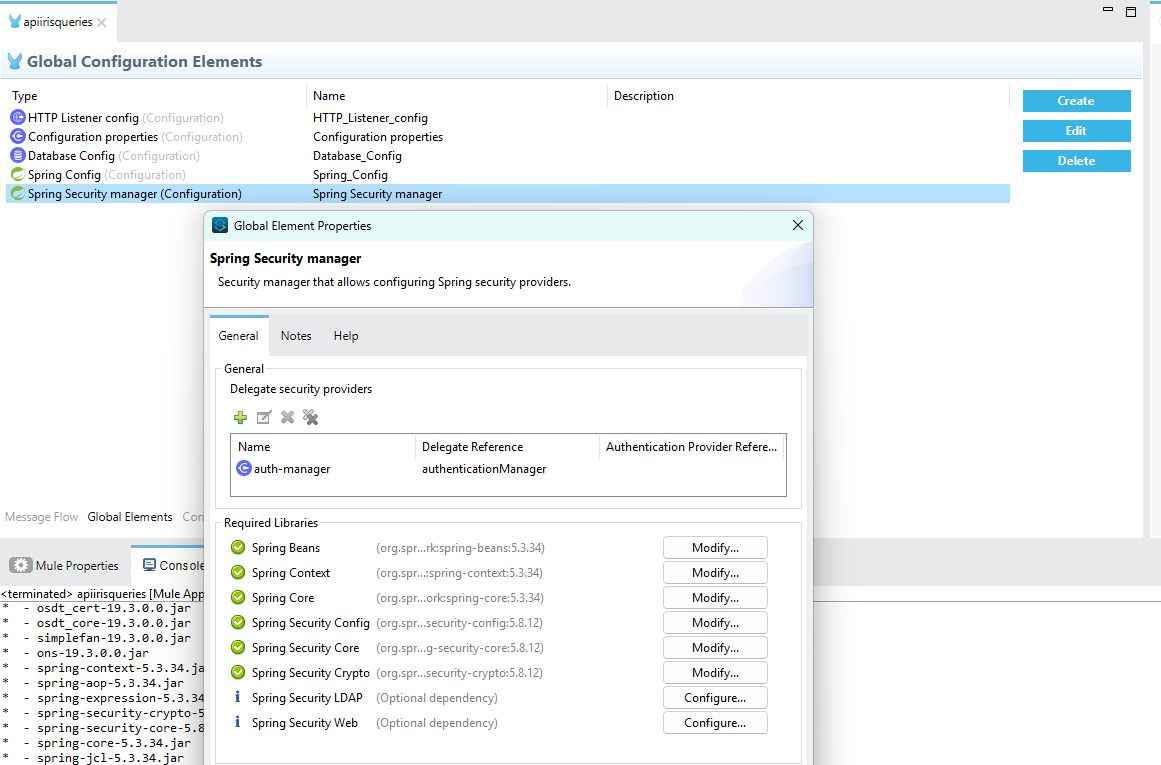
This configuration is currently working and in production.
Conclusions
I believe that in the end, it was simply the update of AnyPoint Studio that solved the problem, but it is also true that the latest version of the Spring module required an updated Runtime, which in turn required an updated version of Java. So it wasn’t difficult to decide to update the entire system.
It would have been better to have a component included in Mulesoft CE to manage authentication, but unfortunately, there isn’t one.
One possibility is to manage the HTTP header verification within the flow and manually check the Basic Authentication or Token. In fact, it is not said that in the future we might consider doing it this way and remove the project’s dependency on Spring.
Sources and References
- Mulesoft, official site.
- Download Mule Kernel, official site.
- Download, Install, Configure, and Upgrade Mule, official site,
- Download and install Anypoint Studio, official site.
- Component Authorization Using Spring Security, official documentation.
- How to solve error: “delegate-security-provider is not allowed to be child of element Spring Security manager”, Mulesoft Community Forum.
- Error using spring 1.3.9 for basic-authentication on a Mule 4 project, Mulesoft Community Forum.
- Which is the best way to add Basic Authentication to a flow implemented with Mule CE 4.50?, Mulesoft Community Forum.
- Multiple spring:delegate-security-provider elements cause a validation error in studio, official documentation.
- Mule Runtime Java Support, official documentation.
- Discussion on Slack channel, search “which is the best way to add the Basic Authentication to a flow” in #technical-questions.
- Java SE 17 Archive Downloads, official Oracle site.+
- Java Adoptium Images, official site.
*** Note: This article was translated using an automated workflow created with n8n and OpenAI.